> ## Documentation Index
> Fetch the complete documentation index at: https://docs.velyti.com/llms.txt
> Use this file to discover all available pages before exploring further.
# Attorneys
> Register the runners and employees who file procedures at the transit agency and choose them on each power of attorney.
An attorney (*apoderado*) is the person who files a procedure at the transit agency (*organismo de tránsito*) with the power of attorney the owner signs. It can be an external runner (*tramitador*) or an employee of the dealership.
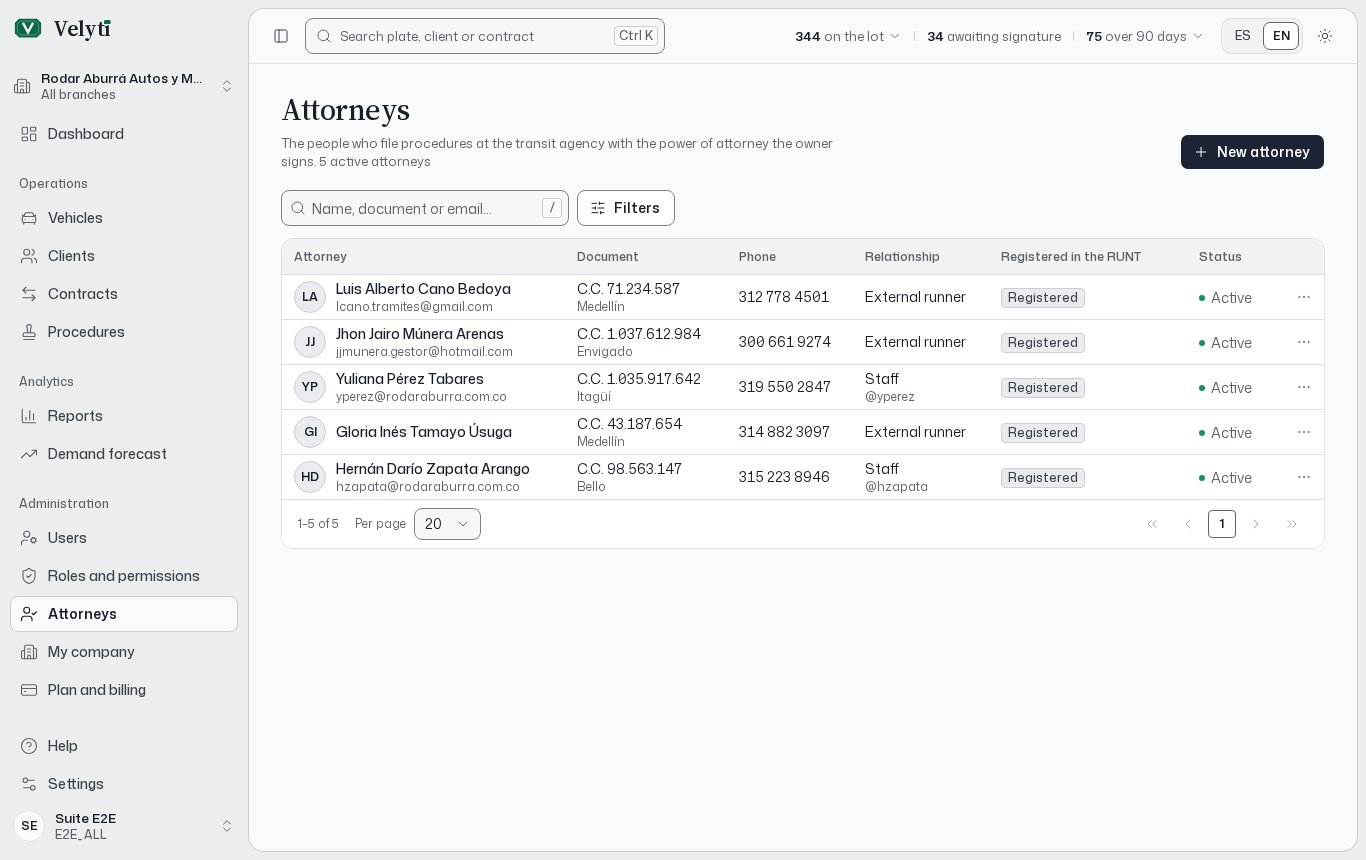 Open **Attorneys** in the menu. The header shows how many attorneys are active and how many are inactive, and the list can be searched by name, document or email.
## The list
| Column | What it shows |
| - | - |
| **Attorney** | Full name. |
| **Document** | Identity document. |
| **Phone** | Contact phone. |
| **Relationship** | **Staff** (an employee with a user) or **External runner**. |
| **Registered in the RUNT** | **Registered** or **Not registered**. |
| **Status** | **Active** or **Inactive**. |
Filter by relationship, by RUNT registration and by status.
The transit agency only accepts procedures filed by people registered in the RUNT. If you choose an attorney marked **Not registered**, the procedure warns you.
## Register an attorney
Select **New attorney**. This button appears only if your role can create attorneys; see [Users and roles](/administration/users-and-roles).
Check **Works for the dealership** to link an employee. Pick their **User**: their details fill in the form. Check the place of issue of the document, which the account does not keep.
Enter the identity and the **Email** and **Phone**. For an external runner, fill in everything yourself.
Turn on **Registered in the RUNT** if they are registered, and save.
You can also create an external attorney without leaving a procedure: on its power of attorney, choose **New attorney**.
## Edit, deactivate or delete
Open the row's actions menu, or the attorney itself, to **Edit** the data.
* **Deactivate** stops offering the attorney when you pick who files a power of attorney. **Activate** offers them again.
* **Delete** only works for an attorney who appears on no power of attorney. Otherwise, deactivate them. Deleting cannot be undone.
If an attorney already chosen on a draft procedure is deactivated, the procedure asks you to choose another.
## Where attorneys are used
On each procedure, the power of attorney names who files it. See [Procedures](/procedures/procedures#power-of-attorney) and [Documents](/contracts/documents).
This documentation is built and hosted on [Mintlify](https://mintlify.com), a developer documentation platform.
Open **Attorneys** in the menu. The header shows how many attorneys are active and how many are inactive, and the list can be searched by name, document or email.
## The list
| Column | What it shows |
| - | - |
| **Attorney** | Full name. |
| **Document** | Identity document. |
| **Phone** | Contact phone. |
| **Relationship** | **Staff** (an employee with a user) or **External runner**. |
| **Registered in the RUNT** | **Registered** or **Not registered**. |
| **Status** | **Active** or **Inactive**. |
Filter by relationship, by RUNT registration and by status.
The transit agency only accepts procedures filed by people registered in the RUNT. If you choose an attorney marked **Not registered**, the procedure warns you.
## Register an attorney
Select **New attorney**. This button appears only if your role can create attorneys; see [Users and roles](/administration/users-and-roles).
Check **Works for the dealership** to link an employee. Pick their **User**: their details fill in the form. Check the place of issue of the document, which the account does not keep.
Enter the identity and the **Email** and **Phone**. For an external runner, fill in everything yourself.
Turn on **Registered in the RUNT** if they are registered, and save.
You can also create an external attorney without leaving a procedure: on its power of attorney, choose **New attorney**.
## Edit, deactivate or delete
Open the row's actions menu, or the attorney itself, to **Edit** the data.
* **Deactivate** stops offering the attorney when you pick who files a power of attorney. **Activate** offers them again.
* **Delete** only works for an attorney who appears on no power of attorney. Otherwise, deactivate them. Deleting cannot be undone.
If an attorney already chosen on a draft procedure is deactivated, the procedure asks you to choose another.
## Where attorneys are used
On each procedure, the power of attorney names who files it. See [Procedures](/procedures/procedures#power-of-attorney) and [Documents](/contracts/documents).
This documentation is built and hosted on [Mintlify](https://mintlify.com), a developer documentation platform.