> ## Documentation Index
> Fetch the complete documentation index at: https://docs.velyti.com/llms.txt
> Use this file to discover all available pages before exploring further.
# Plan and billing
> See your plan, how much of it you use, the modules it includes and the payments Velyti has recorded.
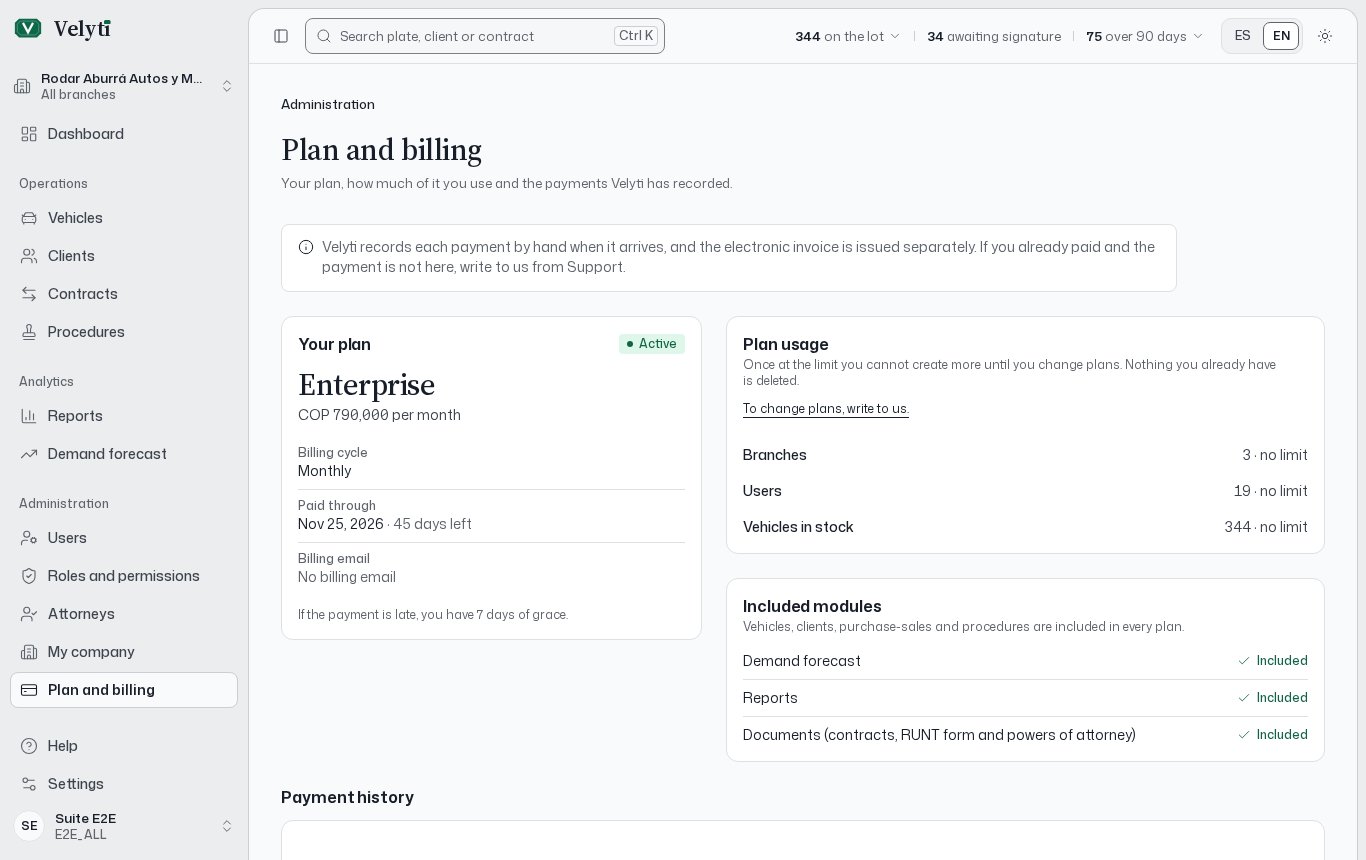
**Plan and billing** shows what your company has contracted with Velyti. You find it under **Administration** in the side menu. It needs the **Subscription** permission.
 If your company has no plan yet, the page says so and asks you to write to us from [Support](/help/support).
## Your plan
The **Your plan** block gives:
* **Status**: **Trial**, **Active**, **Past due**, **Suspended** or **Canceled**.
* **Billing cycle**: **Monthly** or **Annual**, with the **Plan price** per month or per year.
* **Trial ends**, **Paid through** and **Grace period ends** when they apply, with the days left.
* **Grace days**: if the payment is late, the number of days you still have.
* **Billing email**.
### What each status means for you
| Status | What you see |
| - | - |
| **Trial** | A banner counts down to the end of Velyti's free trial. |
| **Active** | Everything works as usual. |
| **Past due** | A banner says the payment was due on a date and that you have until the end of the grace period to catch up. After that, the account becomes read-only. |
| **Suspended** | The account is read-only: you can look up your information, but not create or change records until Velyti records the payment. |
Read-only means exactly that: nothing you already have is deleted, but you cannot create or change records until the payment is recorded.
## Plan usage
**Plan usage** shows how much you use of what the plan allows: **Branches**, **Users** and **Vehicles in stock**, as "used of maximum" or "used, no limit".
The app warns you when you are **Close to the limit**, when you **reached your plan's limit** and when you are **Over your plan's limit**. Once at the limit you cannot create more until you change plans. Nothing you already have is deleted. To change plans, write to us from Support.
## Included modules
**Included modules** lists what your plan has beyond the basics. Vehicles, clients, contracts and procedures are included in every plan. The others are marked **Included** or **Not in your plan**:
* **Demand forecast**: see [Demand forecast](/insights/forecast).
* **Reports**: see [Reports](/insights/reports).
* **Documents** (contracts, RUNT form and powers of attorney): see [Documents](/contracts/documents).
## How to pay
**How to pay** shows the bank details Velyti gives for payment: **Bank**, **Account type**, **Account number**, **Holder** and **NIT**, and a **Pay online** link when there is one.
Pay using the details shown.
Send the receipt from [Support](/help/support) so Velyti records the payment.
When Velyti records it, it appears in **Payment history**.
Velyti records each payment by hand when it arrives, and the electronic invoice is issued separately. If you already paid and the payment is not in the list, write to us from Support.
## Payment history
Each recorded payment shows the date it was paid (**Paid on**), the **Period covered**, the **Amount paid**, the **VAT**, the **Payment method** and the **Invoice**. Until Velyti records a payment, the page says **No payments recorded yet**.
This documentation is built and hosted on [Mintlify](https://mintlify.com), a developer documentation platform.
If your company has no plan yet, the page says so and asks you to write to us from [Support](/help/support).
## Your plan
The **Your plan** block gives:
* **Status**: **Trial**, **Active**, **Past due**, **Suspended** or **Canceled**.
* **Billing cycle**: **Monthly** or **Annual**, with the **Plan price** per month or per year.
* **Trial ends**, **Paid through** and **Grace period ends** when they apply, with the days left.
* **Grace days**: if the payment is late, the number of days you still have.
* **Billing email**.
### What each status means for you
| Status | What you see |
| - | - |
| **Trial** | A banner counts down to the end of Velyti's free trial. |
| **Active** | Everything works as usual. |
| **Past due** | A banner says the payment was due on a date and that you have until the end of the grace period to catch up. After that, the account becomes read-only. |
| **Suspended** | The account is read-only: you can look up your information, but not create or change records until Velyti records the payment. |
Read-only means exactly that: nothing you already have is deleted, but you cannot create or change records until the payment is recorded.
## Plan usage
**Plan usage** shows how much you use of what the plan allows: **Branches**, **Users** and **Vehicles in stock**, as "used of maximum" or "used, no limit".
The app warns you when you are **Close to the limit**, when you **reached your plan's limit** and when you are **Over your plan's limit**. Once at the limit you cannot create more until you change plans. Nothing you already have is deleted. To change plans, write to us from Support.
## Included modules
**Included modules** lists what your plan has beyond the basics. Vehicles, clients, contracts and procedures are included in every plan. The others are marked **Included** or **Not in your plan**:
* **Demand forecast**: see [Demand forecast](/insights/forecast).
* **Reports**: see [Reports](/insights/reports).
* **Documents** (contracts, RUNT form and powers of attorney): see [Documents](/contracts/documents).
## How to pay
**How to pay** shows the bank details Velyti gives for payment: **Bank**, **Account type**, **Account number**, **Holder** and **NIT**, and a **Pay online** link when there is one.
Pay using the details shown.
Send the receipt from [Support](/help/support) so Velyti records the payment.
When Velyti records it, it appears in **Payment history**.
Velyti records each payment by hand when it arrives, and the electronic invoice is issued separately. If you already paid and the payment is not in the list, write to us from Support.
## Payment history
Each recorded payment shows the date it was paid (**Paid on**), the **Period covered**, the **Amount paid**, the **VAT**, the **Payment method** and the **Invoice**. Until Velyti records a payment, the page says **No payments recorded yet**.
This documentation is built and hosted on [Mintlify](https://mintlify.com), a developer documentation platform.