> ## Documentation Index
> Fetch the complete documentation index at: https://docs.velyti.com/llms.txt
> Use this file to discover all available pages before exploring further.
# Profile and settings
> Update your contact details and password, see your permissions, and choose the theme and language.
Two pages are about you alone: **My profile** and **Settings**. Open them from the side menu.
 ## My profile
**My profile** shows three blocks:
* **Account**: the details of your sign-in account.
* **Personal details**: your name and contact details.
* **Permissions**: what your role allows you to do. They are granted by your role, and only an administrator can change them. Roles are assigned by an administrator too; see [Users and roles](/administration/users-and-roles).
The page also lists the contracts you are responsible for, or says **You are not responsible for any contract.**
### Change your details or your password
You can change your contact details or your password.
To change the password, enter the **New password** and repeat it in **Repeat the new password**. It must be between 8 and 72 characters; a long phrase is safer. Leave it blank to keep the current one.
Enter the **Current password**. It is only needed if you are changing your password.
Choose **Save**.
If you forgot your password, use **Forgot your password?** on the sign-in screen. See [Sign in](/getting-started/sign-in).
## Settings
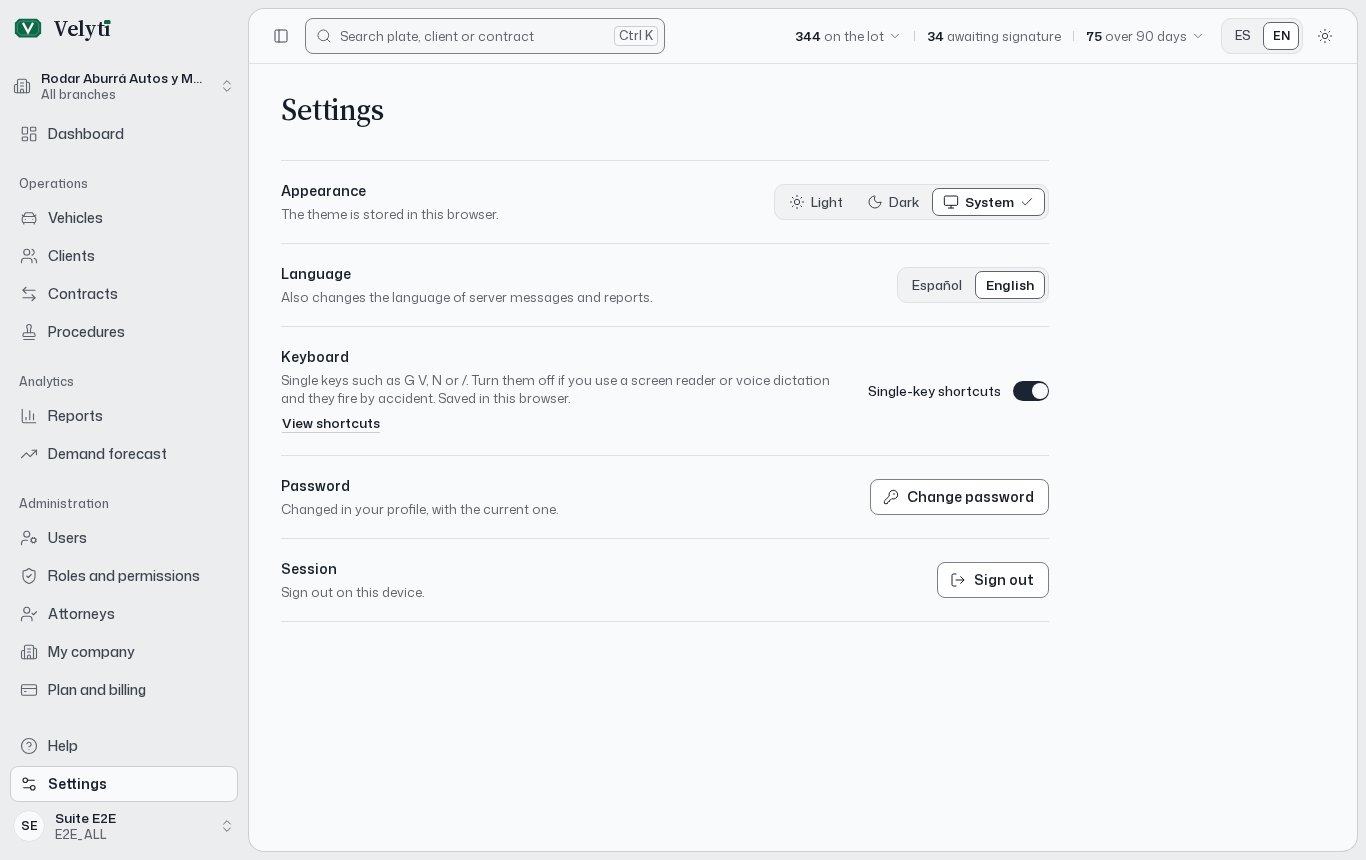
**Settings** collects what depends on this browser or device.
| Setting | What it does |
| - | - |
| **Appearance** | Chooses the theme. The theme is stored in this browser. |
| **Language** | Chooses the language of the app. It also changes the language of server messages and reports. |
| **Keyboard** | Your keyboard-shortcut preference. Saved in this browser. |
| **Session** | Signs you out on this device. |
| **Password** | Opens **Change password**. The password is changed in your profile, with the current one. |
If you turn the one-key shortcuts off, the ones that use Control keep working.
Appearance and keyboard are saved per browser, so on another computer or phone you set them again.
This documentation is built and hosted on [Mintlify](https://mintlify.com), a developer documentation platform.
## My profile
**My profile** shows three blocks:
* **Account**: the details of your sign-in account.
* **Personal details**: your name and contact details.
* **Permissions**: what your role allows you to do. They are granted by your role, and only an administrator can change them. Roles are assigned by an administrator too; see [Users and roles](/administration/users-and-roles).
The page also lists the contracts you are responsible for, or says **You are not responsible for any contract.**
### Change your details or your password
You can change your contact details or your password.
To change the password, enter the **New password** and repeat it in **Repeat the new password**. It must be between 8 and 72 characters; a long phrase is safer. Leave it blank to keep the current one.
Enter the **Current password**. It is only needed if you are changing your password.
Choose **Save**.
If you forgot your password, use **Forgot your password?** on the sign-in screen. See [Sign in](/getting-started/sign-in).
## Settings
**Settings** collects what depends on this browser or device.
| Setting | What it does |
| - | - |
| **Appearance** | Chooses the theme. The theme is stored in this browser. |
| **Language** | Chooses the language of the app. It also changes the language of server messages and reports. |
| **Keyboard** | Your keyboard-shortcut preference. Saved in this browser. |
| **Session** | Signs you out on this device. |
| **Password** | Opens **Change password**. The password is changed in your profile, with the current one. |
If you turn the one-key shortcuts off, the ones that use Control keep working.
Appearance and keyboard are saved per browser, so on another computer or phone you set them again.
This documentation is built and hosted on [Mintlify](https://mintlify.com), a developer documentation platform.